Prepare the customer meeting
Choose the right machine or plant model and the details you want to show during the conversation.
Virtual showroom
With WeAre, sales teams present machines and plants directly in a 3D CAD model – even before a physical exhibit is available. Customers can discuss variants, spatial relationships and open questions with you.

Schauenburg MAB
Head of Sales
Customer story · International sales
“This allows us to reduce travel costs and involve customers more closely in the development process.”
Facing a similar challenge?In 15 minutes, we can explore whether it is worth a closer look.
Book a 15-minute demo
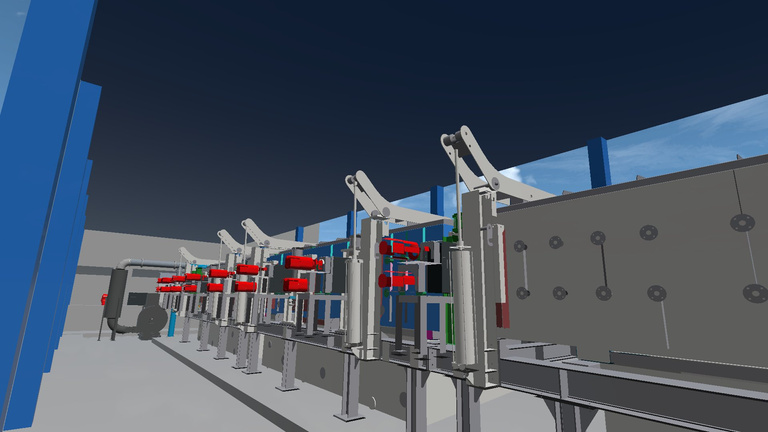
Original images from the whitepaper, pages 3 and 6.
Choose the right machine or plant model and the details you want to show during the conversation.
Explain the layout and spatial relationships on desktop or in VR. Discuss variants and questions directly in the shared model.
Clarify which requirements remain open and which points sales, the customer and engineering should take forward.
For your first session: A suitable CAD model, a specific question and the right participants. We personally review the file format, model scope, hardware and access with you.
The conversion engine prepares your CAD data. No CAD upload is required before your first 15-minute demo.
Explore further
In the full whitepaper: product understanding, customer involvement, VR recordings and preparing your sales team.
WeAre whitepaper · PDF · 9 pages · GermanNo. Participants can also join the discussion on desktop. VR is an additional option when a sense of spatial scale helps the presentation.
Yes, provided a suitable 3D CAD model is available. The details you can show depend on the model and how it is prepared.
With screen sharing, participants follow the presenter’s view. In WeAre, the discussion takes place in a shared 3D model, with the option of bringing desktop and VR participants together.
CAD, desktop and VR: getting started
What could this mean for your project? Let’s explore it in 15 minutes.

15 minutes · personal · no obligation
No CAD upload needed beforehand.